
Advanced Workflow Module Studio automates lookup field updates and sum-up (roll-up) calculations in Zoho CRM using workflow rules, eliminating manual updates and ensuring consistent related-module data across worldwide CRM deployments.
It automates lookup field updates and roll-up calculations in Zoho CRM based on workflow conditions, eliminating manual updates and ensuring consistent related-module data.
Common Problems Without Workflow Automation in Zoho CRM
Without automated workflow field updates, organizations frequently experience:
- Lookup fields showing outdated or incorrect values
- Roll-up totals requiring manual recalculation
- Inaccurate reports and unreliable forecasting
- High maintenance overhead from custom workflow functions
How the Advanced Workflow Module Studio Solves These Problems #
The Advanced Workflow Module Studio addresses these challenges by providing,
- Automatic synchronization between related CRM modules
- Real-time aggregation of numeric values using workflows
- No-code configuration with native Zoho CRM workflow rules
- Centralized audit tracking for every workflow execution
Result: Accurate CRM data, reduced manual effort, and scalable automation across global teams.
How to Automate Lookup Workflow Field Updates and Sum-Up Fields in Zoho CRM #
You can automate lookup field updates and sum-up fields in Zoho CRM by using workflow rules with the advanced Workflow Module Studio.
Create a workflow rule, set triggers (Create, Edit, or Delete), and configure Update Fields or Sum-Up Fields actions to automatically sync related-module data without custom code.
Advanced Workflow Module Studio provides
- Automated lookup field updates across related modules
- Sum-up (aggregate) calculations for numeric fields
- Workflow triggers on Create, Edit, or Delete
- Audit logs for traceability and compliance
- Works across all Zoho CRM global servers
- No dependency on custom functions or scripts
Supported Use Cases
- Automatically update Contact fields from Account data
- Calculate the total invoice value for each Account
- Maintain real-time roll-ups for reporting fields
- Reduce manual CRM maintenance at scale
- Replace custom workflow functions safely
How to Install the Advanced Workflow Module Studio in Zoho CRM #
Follow these steps to install the Advanced Workflow Module Studio from Zoho Marketplace,
- Log in to Zoho Marketplace
- Search for Advanced Workflow Module Studio
- Click Install
- Select the required Zoho CRM organization
Authorize the Extension
- Open Zoho CRM
- Click More Options (⋮) in the top navigation bar
- Select Advanced Workflow Module Studio
- Click Authorize to grant access
After authorization, the Audit Log dashboard becomes available for monitoring workflow executions.
How the Advanced Workflow Module Studio Works #
Advanced Workflow Module Studio integrates directly with Zoho CRM workflow rules and executes lookup updates or sum-up calculations when predefined conditions are met.
Workflow Execution Flow
- A CRM record is created, updated, or deleted
- Workflow rule conditions are evaluated
- Field update or sum-up action is executed
- Related records are updated automatically
- Execution details are logged in the Audit Log
Creating a Workflow Rule in Zoho CRM #
Step 1: Select the Workflow Module
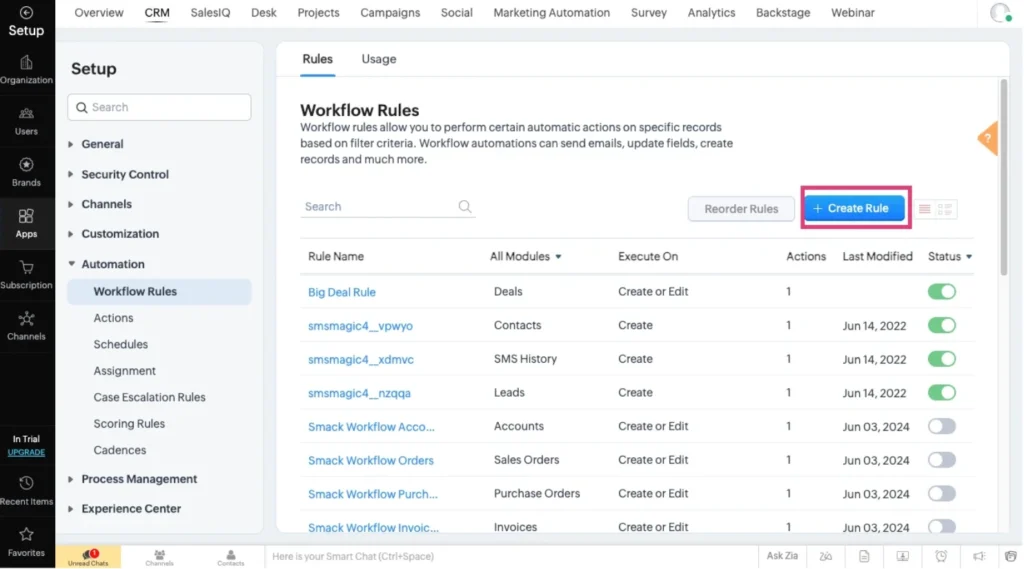
Navigate to Settings → Automation → Workflow Rules → Create Rule. Choose the module where automation should apply
- Contacts
- Accounts
- Deals
- Custom Modules
Provide a clear rule name and description for governance and audit clarity.
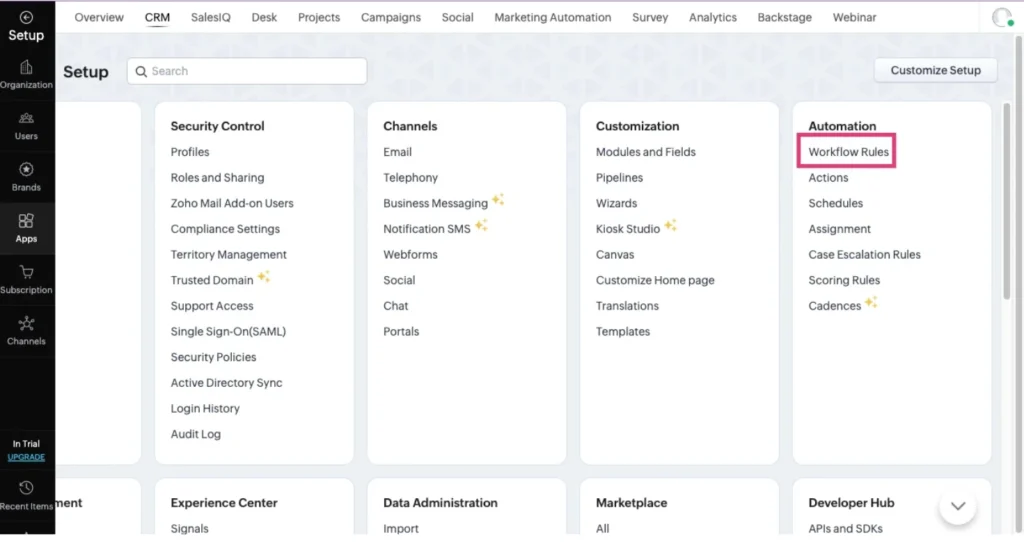
Click on Create Rule
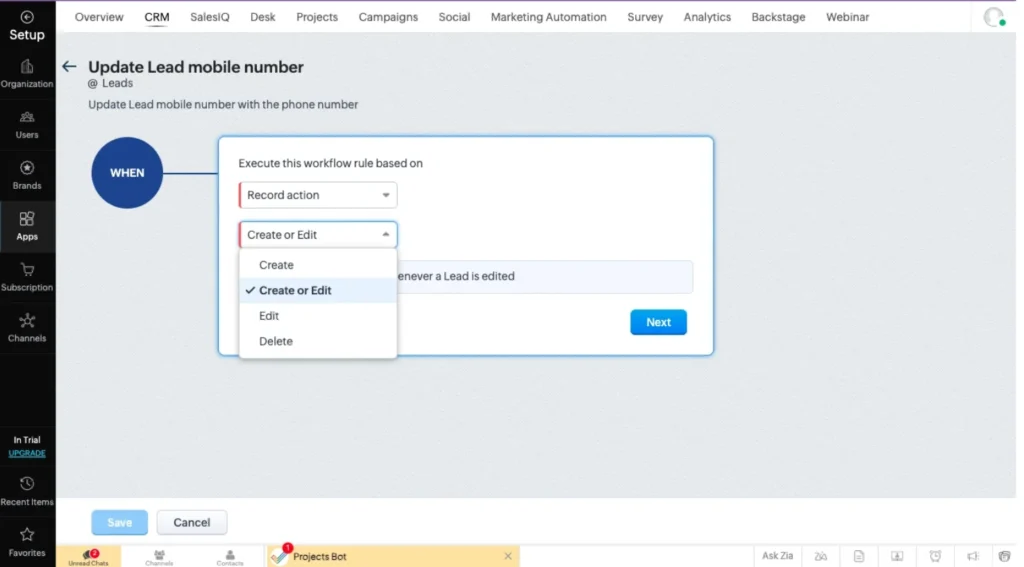
Step 2: Define When the Workflow Executes
Set to execute this workflow rule based on Record Action. Supported triggers,
- On record creation
- On record edit
- On create or edit
- On record deletion
This aligns automation with real CRM lifecycle events.
Step 3: Configure Workflow Conditions
Choose one,
- All records
- Records matching specific conditions
Using targeted conditions improves performance in high-volume CRM environments.
Instant Actions: Advanced Workflow Field Updates Module Studio #
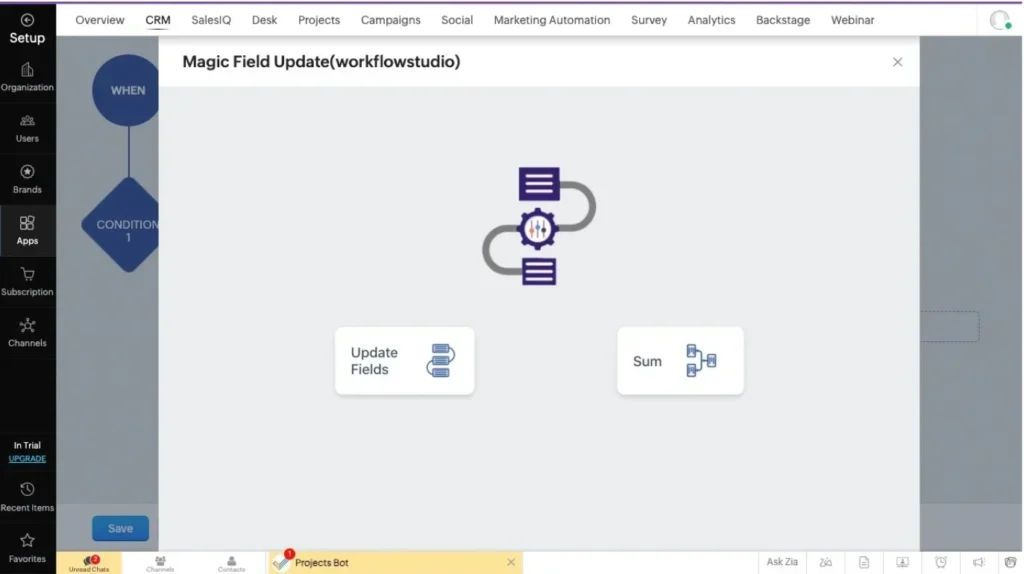
Under Instant Actions, select Advanced Workflow Module Studio.
Two automation options are available,
- Update Fields
- Sum-Up Fields
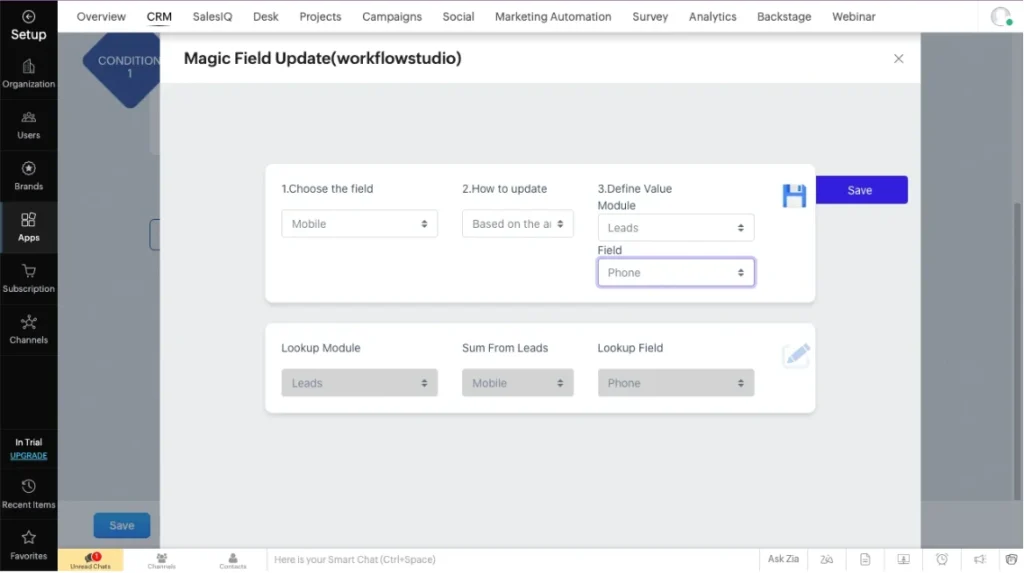
Update Fields – Automate Lookup Field Updates in Zoho CRM Workflows
Automatically updates a field value in the selected module using
- A fixed value, or
- A field from a related module
Configuration Options
Choose the Target Field
Example: Contact First Name
Select Update Method
- Specific Value – Assign a constant value
- Based on Field – Map a related module field (e.g., Account Name)
Practical Example
When a Contact is associated with an Account, the Contact field is automatically updated with Account data, ensuring consistent relational information.
Sum-Up Fields calculates the sum of related records in Zoho CRM
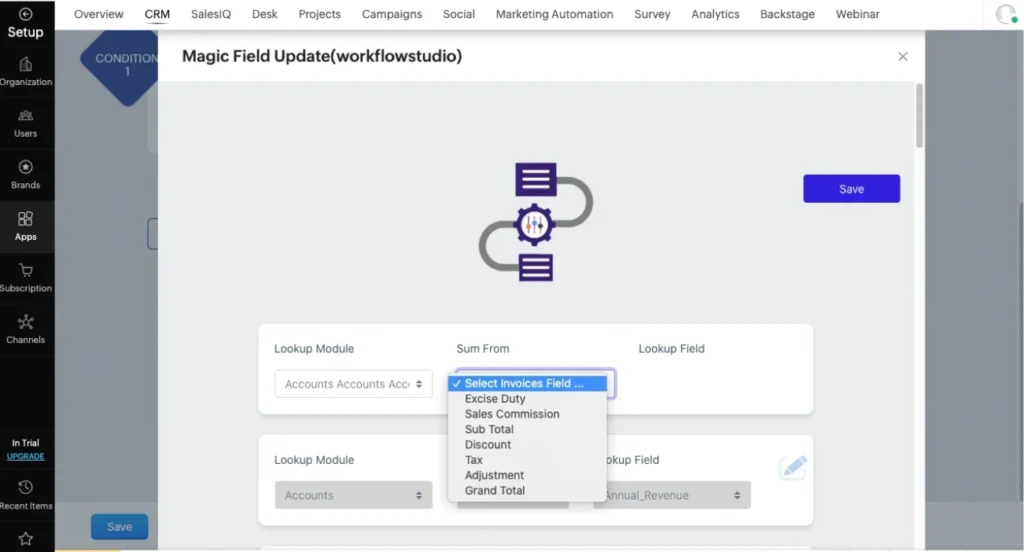
Sum-Up Fields automatically calculate and store the total value of numeric fields from multiple related records whenever a related record is added, updated, or removed.
Configuration Steps
- Select the Lookup Module
(Only modules related to the workflow module are displayed) - Select the Numeric Field
(Only integer-based fields are supported) - Select the Target Lookup Field
(Where the aggregated value will be updated)
Example Use Case
All invoice totals related to an Account are summed and displayed in the Account’s revenue field automatically.
Audit Log and Workflow Monitoring in Zoho CRM Automation #
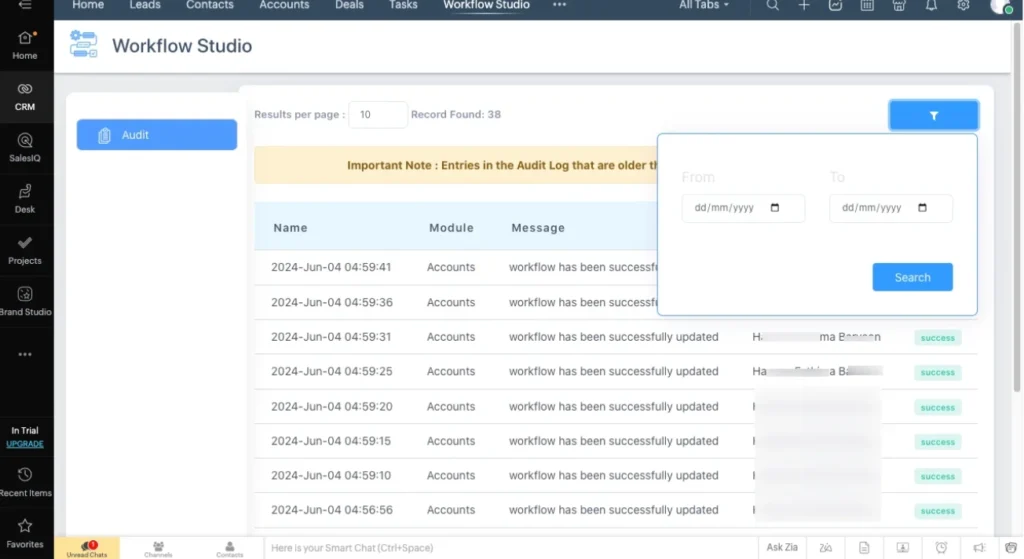
The Audit Log provides full visibility into workflow execution.
What You Can Track
- Updated records
- Execution timestamps
- Success or failure status
- Module-level filtering
- Date-range search
This supports compliance, troubleshooting, and operational transparency.
FAQs #
1. What is the Advanced Workflow Module Studio in Zoho CRM?
Advanced Workflow Module Studio is a no-code workflow automation extension for Zoho CRM that allows you to automatically update lookup fields and calculate sum-up (aggregate) values across related CRM modules using standard workflow rules.
2. Does this Workflow Field Updates module require coding or custom functions?
No. Advanced Workflow Module Studio is a no-code solution. All configurations are performed using Zoho CRM’s native workflow rules, making it suitable for administrators, consultants, and business users without development expertise.
3. Which CRM modules are supported for lookup and sum-up automation?
The module supports all standard and custom modules that have lookup relationships configured in Zoho CRM. Only related modules are displayed during configuration to ensure accurate and valid automation.
4. When do workflow field updates and sum-up calculations trigger?
Workflow actions trigger based on the selected record action, including
– Record creation
– Record update
– Record creation or update
– Record deletion
This ensures automation aligns with real CRM data lifecycle events
5. Are workflow executions and updates tracked?
Yes. Every lookup field update and sum-up calculation is recorded in the Audit Log, including execution time, module name, record details, and success or failure status. This provides full transparency and supports troubleshooting and compliance needs
6. Can this module replace the existing custom workflow scripts?
In most use cases, yes. Advanced Workflow Module Studio can replace custom functions used for lookup synchronization and roll-up calculations, reducing maintenance overhead while improving reliability and audit visibility.
Best Practices for High-Scale CRM Automation #
- Use specific conditions to limit workflow executions
- Validate numeric fields before configuring sum-up logic
- Review audit logs regularly
- Use descriptive workflow names for long-term governance
Advanced Workflow Module Studio enables no-code automation of lookup field updates and sum-up calculations in Zoho CRM using workflow rules, ensuring accurate related-record data, global compatibility, and enterprise-grade audit visibility.
Support
Our support team helps you get the most out of Workflow Field Updates Studio for Zoho CRM. We assist with installation, configuration, workflow setup, lookup field automation, sum-up calculations, and troubleshooting to ensure smooth and reliable operation.
If you have questions, need guidance, or encounter any issues while using Workflow Studio, feel free to reach out to us.
Email: [email protected]
We are committed to providing timely, expert support for users across all Zoho CRM global servers.